
Description
🔌 What It Is — A Modern USB Flash Drive
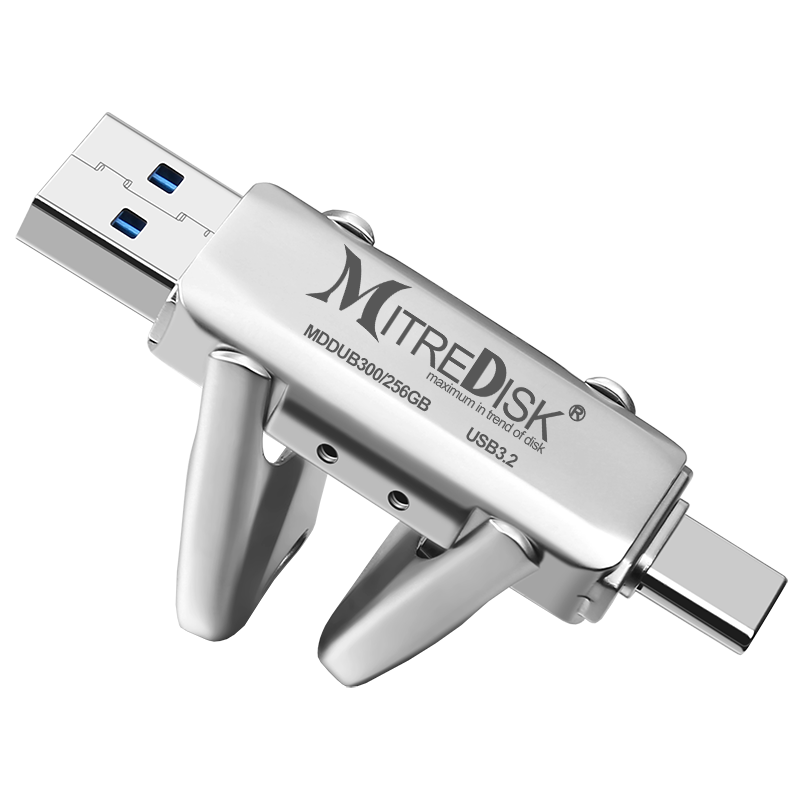
A USB flash drive (also called a pen drive, thumb drive, USB stick, or flash disk) is a small portable storage device that you plug into a computer, tablet, smartphone, TV or other electronics to store and transfer files like photos, videos, documents, music, and software.
This particular type:
-
Uses USB 3.2 technology, which is a modern standard for fast data transfer.
-
Has a USB Type-C connector, which is the newer, reversible USB plug used on many modern phones, tablets, laptops, and desktops (no “up or down” plug orientation).
-
Claims high-speed performance and often includes a lifetime warranty from the manufacturer, meaning they promise support or replacement for the usable life of the product (specific warranty terms vary by brand). Gear-Up
🚀 USB 3.2 — What That Means
USB standards define how fast data can travel between the flash drive and your device.
-
USB 3.2 is a much faster standard compared with older USB 2.0 drives. Depending on the exact generation and implementation, it can transfer data many times faster: from roughly 100 MB/s and above, compared with ~30 MB/s on old USB 2.0 drives. Gear-Up
-
Faster speeds mean quicker file transfers — huge folders of photos, long videos, or large project files take much less time to copy.
-
USB 3.2 flash drives are also backward compatible with older USB ports (USB 3.0 or USB 2.0), though they’ll operate at slower speeds if plugged into older ports. Gear-Up
🔌 USB-C Connector — Modern & Convenient
The Type-C connector is the newer USB plug standard that:
✔ Is reversible — no more flipping the plug to insert it correctly.
✔ Is used on many recent devices — newer Android phones, tablets, laptops, Ultrabooks, and even some desktops.
✔ Often supports faster power delivery and data transfer than older USB-A plugs. Gear-Up
With Type-C, you can connect the USB drive directly to your device without needing an adapter — easy for mobile devices and computers alike.
📦 Typical Storage Capacities
USB flash drives come in various storage sizes depending on what you need:
-
32 GB / 64 GB — good for basic photos, documents, and small files.
-
128 GB — enough for larger music libraries, presentations, and HD videos.
-
256 GB or more — better for large photo/video collections or backup of important files. Gear-Up
Note: Some very low-priced drives advertised with unrealistic large capacities (e.g., “2 TB” at very low cost) may in fact be fake or fabricated, meaning they show a large capacity but cannot actually store that much — be cautious and buy from reputable sellers. Reddit+1
📂 What It’s Good For
A USB drive like this can be used for:
📁 Everyday File Storage
-
Save family photos, school projects, music, and documents.
-
Carry files between devices without needing internet or cloud storage.
💻 Backups & Transfers
-
Quickly back up important files from your laptop or phone.
-
Share files with colleagues, classmates, or friends.
📱 Mobile Use (with OTG support)
-
Some USB-C drives support OTG (On-The-Go) which lets phones and tablets read and write files directly without a computer — ideal for managing media on mobile devices. adata.com
🛡️ Warranty — What “Lifetime” Might Mean
When a flash drive is marketed with a lifetime warranty, this usually means:
✔ The manufacturer guarantees the product against defects in materials or workmanship for as long as you own it.
✔ If the drive fails due to a manufacturing defect, the company may repair or replace it.
⚠️ Important: Warranty detail depends on the brand’s policy — “lifetime” often refers to the expected usable life of the device, not indefinite consumer use. Always check the specific warranty terms from where you bought it.
📊 Performance & Real-World Use
Although USB 3.2 enables high speeds:
-
Transfer rates vary based on the device you plug into (some computers or phones have slower USB ports).
-
Newer drives can read and write files much faster than older USB 2.0 sticks, making them more practical for large files like HD videos or game data. Gear-Up
Because flash drives don’t have moving parts, they’re durable, lightweight, and portable, ideal for carrying in a pocket, bag, or on a keychain.
🔄 Compatibility
Modern USB-C flash drives typically work with:
✅ Windows PCs and laptops
✅ macOS computers
✅ Android phones/tablets with USB-C
✅ Some tablets and hybrid devices
✅ USB hubs and charging docks (with data support)
Older devices with only USB-A ports may require a Type-C to Type-A adapter to connect. Gear-Up
🧠 Summary — What You’re Getting
This product is a USB 3.2 high-speed USB-C flash drive that is:
✔ Fast for transferring files
✔ Portable and plug-and-play
✔ Compatible with many modern devices
✔ Backed by a (claimed) lifetime warranty for peace of mind
It’s a versatile storage tool for students, professionals, creators, and everyday users who want to store, transfer, and back up files quickly and conveniently.

Reviews
There are no reviews yet.