
Description
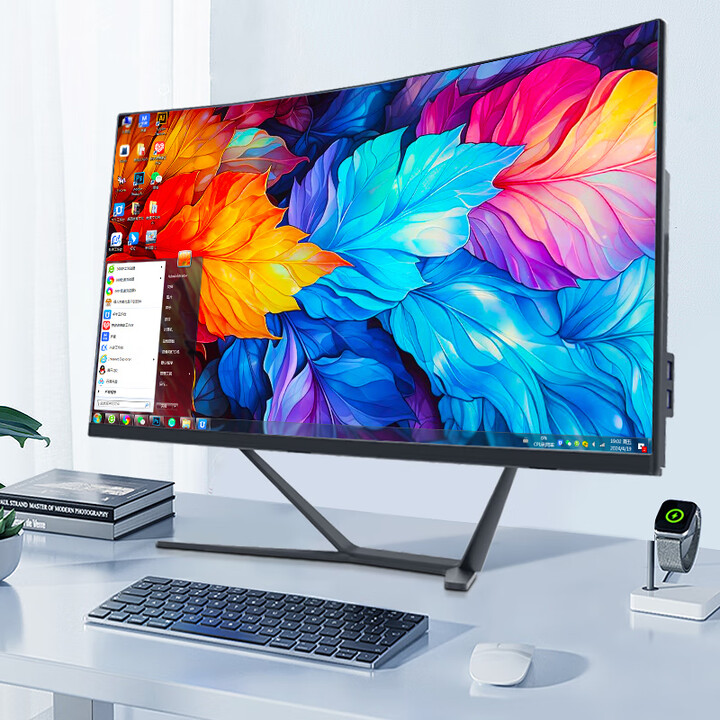
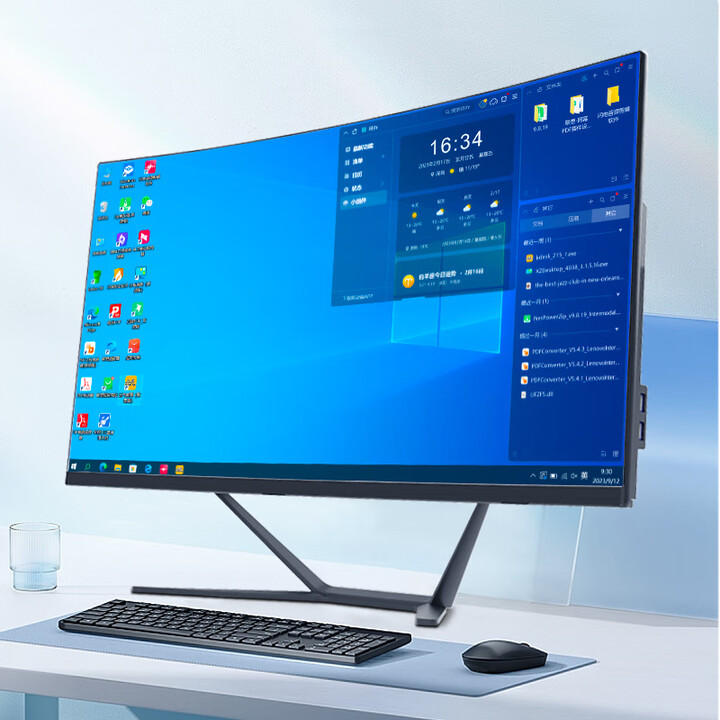
A “27-inch All-in-One PC” refers to a desktop computer built into a slim chassis with a 27″ display integrated into the unit, rather than a separate monitor and tower. The entire computer hardware (processor, memory, storage, graphics, I/O ports, power supply) is contained behind or beneath the screen. The configuration you described offers:
-
Display size: ~27 inch diagonal.
-
Processor options: Intel Core i5 or Intel Core i7 (depending on model/configuration).
-
Memory options: 8 GB, 16 GB or 32 GB of RAM.
-
Storage: 512 GB SSD (solid‐state drive) for fast system boot and application loading.
-
Form‐factor: All-in-One (AIO), meaning minimal footprint (monitor + computer in one).
-
Use-case: Home office, general productivity, media consumption, light creative work, possibly some light gaming or casual use.
🖥 Key Features & Benefits
1. Large 27″ Display
With a 27-inch screen you get a generous amount of screen real-estate — ideal for multitasking, splitting windows, watching videos, editing documents or photos. Many modern 27″ AIOs use IPS panels with good colour reproduction, anti-glare coatings and narrow bezels. For example: one model includes a 27″ full-HD (1920×1080) IPS display with three-sided micro-edge and anti-glare. HP+1
Larger screens also mean you sit a bit further back, which is comfortable for longer use.
2. Integrated System – Minimal Clutter
Because it’s all in one unit, there’s less desk clutter: no separate tower, fewer cables, fewer components visible. You typically get a wireless keyboard & mouse bundled (depending on brand). This makes it a clean, modern setup — good for home offices, living rooms, or shared spaces.
3. Good Performance Options
With a Core i5 or Core i7 processor and SSD storage you are getting modern performance. For example: one HP model shows a Core i7-1355U with 8 GB RAM + 512 GB SSD. HP
Another shows Core i5 with 16 GB RAM + 1 TB SSD in a 27″ AIO. HP
Thus, you can pick a configuration that scales with your needs — basic usage (8 GB RAM) up to heavier multi-window work or light creative tasks (16-32 GB RAM).
The SSD ensures snappy system response and fast booting/loading.
4. Compact Footprint & Stylish Design
Many AIO systems are designed with aesthetics and space-saving in mind: thin profiles, edge-to-edge glass, minimal bezels, sleek stands. This makes them appealing in living rooms or modern workspace setups. Some support tilt or height adjustment. For example: the HP 27″ AIO uses three-sided micro-edge, anti-glare panel. HP
5. Good Connectivity
Modern AIOs include a variety of ports (USB-C, USB-A, HDMI, Ethernet, audio jack), WiFi + Bluetooth, often camera & microphone built-in. For example: the HP 27″ model includes USB Type-C 5Gbps, USB Type-A ports, HDMI-out, RJ-45, etc. HP
Built-in webcam, speakers, and microphone arrays make video calls and streaming straightforward.
🧭 Typical Configuration Breakdown
Here’s how the options you listed generally map to usage scenarios:
-
8 GB RAM / 512 GB SSD / Core i5: Good for general everyday use — web browsing, email, office applications, streaming media, light photo editing.
-
16 GB RAM / 512 GB SSD / Core i5 or Core i7: Better for more multitasking, having many browser tabs open, maybe light video editing, casual gaming, moderate productivity tasks.
-
32 GB RAM / 512 GB SSD / Core i7: For users who want extra head-room — heavy multitasking, large spreadsheets, photo/video editing, creative software, maybe running virtual machines or doing more demanding work.
The 512 GB SSD is also a sweet spot for many users (ample storage for OS, apps, documents, media files), though if you deal with large video files you might opt for 1 TB or more.
🎯 Use-Case Scenarios
-
Home & family computer: Everyone uses it for browsing, streaming, schoolwork, home office. Big screen is great for shared use.
-
Work from home / home office: A stylish, functional desktop with minimal footprint; you get full-size keyboard + mouse, good screen size, clean desk.
-
Content consumption / media & streaming: 27″ display immerses you in movies, video, YouTube, streaming services.
-
Light creative work: Photo editing, video light editing, design work can be handled especially with 16-32 GB RAM + Core i7.
-
Space-conscious setups: Because the computer is in the display, you save on space compared to tower + monitor.
-
Shared or communal spaces: Living room, study, reception area — one machine serves many.
⚠️ Things To Watch & Potential Limitations
-
Upgradeability: Many AIO systems have limited upgrade options compared to towers. RAM may be somewhat accessible, but storage or GPU may be soldered or difficult. If future upgrades matter, check the model’s service/upgrade specs.
-
Cooling & performance head-room: AIOs are compact, so cooling is more constrained than big towers. For extremely heavy workloads or high-end gaming, performance may be less than a comparable tower.
-
Graphics capability: Most AIOs use integrated graphics (Intel UHD/Iris) or modest dedicated GPUs; if you plan intensive 3D work or high-end gaming you’ll need to check if the model has a discrete GPU.
-
Screen resolution: Some 27″ AIOs are 1920×1080 (FHD). At 27″ that results in lower pixel density than 1440p or 4K. If you sit close or want sharper visuals, consider a higher resolution model. For example: some models do offer 4K in 27″. ASUS
-
Repairability & lifecycle: Because many parts are integrated behind the screen, repairs could be more complicated or costly than a traditional desktop.
-
Cost vs tower + monitor: Sometimes you may pay a premium for the convenience/integration. For similar performance a separate tower + monitor could offer more power or upgrade-paths, depending on budget.
-
Touchscreen / non-touchscreen: Decide whether you want touch capabilities (some 27″ AIOs offer it).
-
Stand/tilt/ergonomics: Check how the screen can adjust (tilt, height, pivot) to ensure ergonomic comfort.
📝 Example Specification (typical for this class)
Here’s a hypothetical spec based on your options:
-
Display: 27″ diagonal, IPS panel, Full HD (1920×1080) or possibly QHD (2560×1440), anti-glare, three-sided micro-edge.
-
Processor: Intel Core i5 (10th/11th/12th Gen) or Intel Core i7 (same generation).
-
RAM: 8 GB / 16 GB / 32 GB DDR4 (or DDR5 if latest).
-
Storage: 512 GB PCIe NVMe SSD.
-
Graphics: Integrated Intel UHD/Iris graphics (or optional entry discrete GPU).
-
Connectivity: WiFi 6, Bluetooth 5.x, Ethernet port, multiple USB ports (USB-C, USB-A), HDMI-in/out.
-
Peripherals: Wireless keyboard & mouse included. Built-in 720p or 1080p webcam, stereo speakers, microphone array.
-
Operating System: Windows 11 Home (or equivalent).
-
Form factor: All-in-One with stand, minimal cabling.
-
Additional: Maybe touchscreen optional, VESA mount compatible (depending on model).
Example specific model: The HP 27-inch All-in-One (27-cr0057nh) uses a 13th Gen Intel Core i7, 8 GB DDR4, 512 GB SSD and 27″ FHD IPS display. HP
Another example: ASUS All-in-One 27″ model with Intel Core i5, 8 GB DDR5, 512 GB SSD. ASUS Store
🔍 Why Choose This Configuration?
-
Balanced performance & usability: The combination of a capable CPU (i5/i7), fast SSD, and decent RAM means this machine will feel responsive for many years.
-
Large, integrated display: Having a big screen built in means you don’t need to buy a separate monitor; everything is streamlined.
-
Simplified setup: One power cable, one stand, everything built-in — great if you don’t want to deal with multiple components.
-
Modern features: With SSD, WiFi 6, good I/O, you’re getting up-to-date hardware.
-
Good for future-proofing (to some extent): If you select 16-32 GB RAM and the Core i7 variant, you’re more ready for upcoming tasks than a very basic system.
Reviews
There are no reviews yet.