
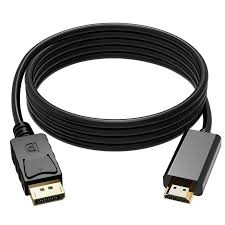
Description
A DisplayPort to HDMI adapter or cable is a highly versatile and essential connectivity solution designed to bridge the gap between devices that use DisplayPort output—commonly found on computers, graphics cards, and docking stations—and HDMI input, which is standard on monitors, TVs, and projectors. This adapter enables seamless audio and video transmission, allowing users to connect modern computers to external displays for work, entertainment, or presentations with outstanding clarity and reliability.
🔌 Purpose and Functionality
The primary function of a DisplayPort to HDMI cable is to convert digital signals from a DisplayPort source (like a desktop PC, laptop, or workstation) into HDMI format, which is recognized by HDMI-equipped displays. This makes it incredibly useful for connecting high-performance systems to large-screen displays or multimedia setups.
DisplayPort, developed by the Video Electronics Standards Association (VESA), is a cutting-edge interface that supports ultra-high resolutions, fast refresh rates, and advanced features like adaptive synchronization. HDMI, on the other hand, is the global standard for TVs, projectors, and home entertainment systems. By combining these two technologies, the adapter ensures universal compatibility and simplifies multi-display setups in both professional and personal environments.
🖥️ High-Quality Video and Audio Transmission
Modern DisplayPort to HDMI adapters support resolutions up to 4K Ultra HD (3840 × 2160 pixels) at 60Hz, delivering incredibly sharp images with rich color depth and smooth motion. Some advanced versions even support 8K resolution and HDR (High Dynamic Range) for lifelike visuals with enhanced brightness, contrast, and color accuracy.
In addition to video, the adapter carries digital audio signals, supporting high-definition sound formats like Dolby TrueHD and DTS-HD Master Audio. This ensures synchronized audio and video output for movies, games, and presentations without the need for additional audio cables.
⚙️ Build and Compatibility
DisplayPort to HDMI adapters come in several forms:
-
Passive adapters (for dual-mode DisplayPort or DP++): These rely on the graphics card’s built-in conversion capabilities and are suitable for most standard connections.
-
Active adapters: These contain a built-in chip to convert the DisplayPort signal to HDMI, essential for devices that don’t support DP++ (such as some professional GPUs or older systems).
Most adapters and cables are plug-and-play, requiring no drivers or software installation. They are compatible with a wide range of devices, including:
-
Laptops and desktops with DisplayPort or Mini DisplayPort output
-
Monitors, HDTVs, and projectors with HDMI input
-
Gaming consoles, docking stations, and GPUs that need HDMI connectivity
🧱 Design and Construction
A high-quality DisplayPort to HDMI adapter typically features a durable, gold-plated connector that resists corrosion and ensures stable signal transmission. The cable is often wrapped in a braided nylon or PVC jacket for flexibility and protection against wear. Inside, copper conductors and shielding layers minimize electromagnetic interference (EMI), ensuring clear, uninterrupted video and audio output.
Some adapters include locking mechanisms on the DisplayPort connector to prevent accidental disconnections, while compact versions are designed for portable use, ideal for professionals who travel frequently or give presentations.
⚡ Performance and Technical Capabilities
-
Video Support: Full HD (1080p), 2K, 4K, and in newer versions, up to 8K
-
Audio Support: Up to 8-channel LPCM, compressed audio (AC-3, DTS), and lossless formats
-
Refresh Rates: 60Hz at 4K, up to 144Hz at 1080p for gaming and high-performance monitors
-
Color Depth: 8-bit, 10-bit, or 12-bit depending on model
-
Bandwidth: Supports up to 18Gbps or higher (HDMI 2.0 or HDMI 2.1 standard)
🏢 Ideal Use Cases
-
Office Work & Productivity: Extend your laptop display to a larger monitor for multitasking or presentations.
-
Home Entertainment: Connect your PC or media player to a 4K television for streaming and gaming.
-
Education & Training: Use projectors or classroom displays for visual lessons and seminars.
-
Professional & Creative Work: Ideal for designers, video editors, and engineers who rely on multiple monitors or high-resolution displays.
🔧 How to Use
-
Plug the DisplayPort end into your computer or graphics card.
-
Connect the HDMI end to your monitor, TV, or projector.
-
Power on both devices—the signal should be automatically detected.
-
Adjust display settings in your system (e.g., extend, duplicate, or use as primary display).
Most adapters are unidirectional, meaning they only work from DisplayPort to HDMI, not the other way around. Users must ensure the correct signal direction for proper functionality.
🛡️ Durability and Reliability
These adapters are engineered for long-term use, with heat-resistant materials, reinforced connectors, and secure signal shielding to prevent loss of quality. The sturdy build ensures consistent performance even under daily plug-in and unplug cycles.
💎 In Summary
The DisplayPort to HDMI adapter or cable is a vital accessory for anyone needing to connect a DisplayPort-enabled device to an HDMI display. It offers seamless signal conversion, crystal-clear 4K visuals, high-fidelity audio, and universal compatibility in a compact, durable design. Whether used for business presentations, gaming setups, multimedia streaming, or multi-monitor workstations, it delivers the perfect combination of performance, convenience, and reliability.


Reviews
There are no reviews yet.